Marketing Automation Services in the USA: What Should You Actually Automate?

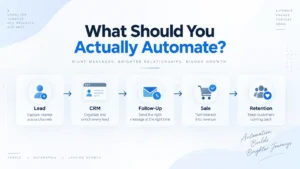
Most businesses looking for marketing automation services start with the wrong question.
They ask:
“What can we automate?”
I prefer to start somewhere else:
“Where are we losing leads, time, or revenue because the next step depends on someone remembering to do it?”
That difference matters.
I’ve seen businesses generate enquiries from Google Ads, Meta Ads, websites, landing pages, forms, and other channels, only for those opportunities to slow down once they reach the CRM.
Someone forgets to follow up. Nobody knows who owns the lead. An appointment is missed and never recovered. A prospect keeps receiving follow-ups even though they already booked. Hundreds of old leads sit untouched inside a database.
Adding another automation tool doesn’t automatically fix any of this.
A useful marketing automation system connects the customer journey so the right action happens when it needs to happen—and a human takes over when judgment is required.
If you’re a US business evaluating marketing automation services, that’s what I would focus on before comparing platforms, workflow counts, or impressive-looking AI features.
For a broader look at how I connect automation with acquisition, CRM, sales, and growth, you can also read my Marketing Automation & Growth Guide.
What Are Marketing Automation Services?
Marketing automation services involve designing, building, and improving systems that handle repeatable parts of the marketing and sales process.
That can include CRM automation, lead routing, email and SMS follow-up, appointment reminders, lead nurturing, pipeline management, database reactivation, sales tasks, reporting, and integrations between platforms.
But I think the technical definition misses the bigger point.
The real purpose of automation is to create a reliable next step.
Someone submits an enquiry.
What happens next?
They don’t reply.
What happens next?
They book an appointment.
What happens next?
They don’t show up.
What happens next?
They become a customer.
What happens next?
If those answers depend entirely on someone remembering what to do, you don’t really have a system yet.
Before You Automate Anything, Find the Leak
I used to think about automation mainly in technical terms.
Triggers. Actions. Tags. Webhooks. Delays. Conditions. Integrations.
I still work with all of those things, but experience changed the way I approach the problem.
Now I look at the customer journey first.
For many lead-driven businesses, it looks something like this:
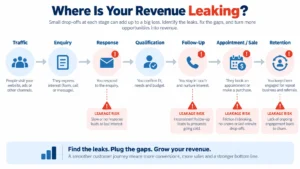
Traffic → Enquiry → Response → Qualification → Follow-Up → Appointment or Sale → Retention → Reactivation
Then I ask one question:
Where are people disappearing?
That’s usually where the highest-value automation opportunity is hiding.
Response Leakage
A prospect submits a form but doesn’t receive a meaningful response quickly enough.
The CRM might have captured the contact perfectly. Technically, nothing is broken.
Commercially, however, the opportunity is already becoming colder.
Automation can acknowledge the enquiry, preserve the lead source, create the opportunity, alert the appropriate person, and make the next action clear.
The salesperson still sells.
The system simply makes sure the opportunity reaches them.
Follow-Up Leakage
This is one of the most common problems I see.
Someone follows up once.
Maybe twice.
Then the prospect disappears into the database.
But no response doesn’t always mean no interest.
Timing changes. Budgets change. Priorities change. People get busy.
A sensible follow-up system can maintain the conversation without turning into spam.
And this part matters:
Automation should react to context.
If somebody replies, books, or buys, the previous sequence should stop or change.
Otherwise, you’re not improving the customer experience.
You’re simply automating noise.
Pipeline Leakage
A CRM is useful only when it tells the team what is actually happening.
When I look at an opportunity, I want to understand:
Where did this person come from?
Who owns the opportunity?
What happened last?
Where are they now?
What needs to happen next?
If the CRM can’t answer those questions, building another ten workflows normally makes the problem worse.
Fix the structure first.
Then automate around reliable data.
Appointment Leakage
Appointment-based businesses have another problem.
Booking the appointment isn’t the finish line.
Someone can still forget, cancel, or simply not show up.
A good system handles confirmation and reminders, but it also defines what happens after a no-show.
Does the opportunity disappear?
Does somebody manually remember to call?
Or does the system move the person into a recovery path and give them an easy way to reschedule?
That difference can become significant when you’re dealing with hundreds of appointments.
This is especially important in healthcare and aesthetics, where the customer journey can include enquiry, qualification, consultation, reminders, attendance, treatment, and reactivation. I explain that process in more detail in my Marketing Automation for Clinics & Med Spas article.
Reactivation Leakage
This is probably one of the most overlooked areas.
Businesses spend thousands acquiring leads and customers, then focus almost entirely on finding new ones.
Meanwhile, the CRM contains previous enquiries, old opportunities, former customers, cancelled appointments, and people who were interested six months ago.
I don’t automatically assume all of them should receive another campaign.
But I do ask whether there is a legitimate reason to reconnect.
Sometimes your next growth opportunity is already sitting inside the database you paid to build.
What Should a Business Automate First?
If I were starting from scratch, I would not build a sophisticated AI agent on day one.
I’d first make the boring parts reliable.
Those are usually the parts costing businesses money.
1. New Lead Response
The first workflow should make sure every legitimate enquiry enters the correct system and somebody knows about it.
A new lead might come from Google Ads, Facebook, Instagram, a website form, landing page, call, chat, or another source.
The automation should preserve that context.
A simple journey could look like this:
New enquiry → CRM contact → Source recorded → Opportunity created → Acknowledgement → Owner notified → Follow-up begins
Nothing revolutionary.
But if that chain works every time, you have solved a real operational problem.
2. Lead Ownership and Routing
One of the easiest ways to lose an opportunity is to let everybody assume somebody else is handling it.
Automation can route enquiries based on service, location, sales territory, campaign, customer type, or other business rules.
But the most important result is much simpler:
Every real opportunity should have an owner.
Someone should be responsible for moving it forward.
3. No-Response Follow-Up
A follow-up workflow doesn’t need twenty-five messages.
In many cases, it shouldn’t.
I would rather build a short sequence with clear logic and stop conditions than bombard someone simply because the CRM allows it.
The workflow might combine email, SMS, sales tasks, or another appropriate communication channel depending on the business.
The objective isn’t maximum message volume.
It’s maintaining a reasonable path back into the conversation.
4. Appointment Reminders and No-Show Recovery
For clinics, consultants, service businesses, and other appointment-driven companies, this is usually one of the first automations worth building.
A customer books.
They receive confirmation.
They receive an appropriate reminder.
If they attend, the journey moves forward.
If they don’t, the CRM should know that too.
A no-show is a business event.
Treat it like one.
5. CRM Pipeline Automation
The CRM should support the sales team instead of creating another administrative job.
Certain events can update pipeline stages, create tasks, assign owners, or alert the team automatically.
But I don’t recommend automating stage movement just because it’s possible.
A stage should only change when the business has a reliable signal that something actually changed.
I learned this lesson again during one of my GoHighLevel projects.
A Real GoHighLevel Problem Changed How I Designed the Workflow
In one project, the business wanted new leads connected with the owner immediately.
The intended process was straightforward.
A lead submits an enquiry.
GoHighLevel calls the owner.
A whisper message tells them a new lead is waiting.
The owner accepts and gets connected.
During testing, however, I found a problem.
If the owner answered but didn’t complete the connection, GoHighLevel could record the call as unsuccessful.
The obvious solution was to use that call status to trigger the follow-up.
Except it wasn’t reliable enough for the workflow logic I needed.
I could have kept trying to force the original architecture.
Instead, I changed it.
We used the CRM pipeline stage as the more reliable signal.
If the connection wasn’t accepted, the opportunity moved into a Call Not Accepted stage.
That stage triggered the next follow-up action.
The journey became:
Lead enquiry → Owner call → Connection accepted
or:
Lead enquiry → Connection not accepted → CRM stage updated → Follow-up triggered
What I liked about this solution wasn’t that it was technically complicated.
It wasn’t.
The important part was that we stopped building an important business process around a signal I didn’t trust.
That’s something I’ve learned repeatedly with automation:
Don’t design the business around the software limitation. Change the architecture until the business outcome becomes reliable.
You can see the full workflow and the reasoning behind it in my GoHighLevel Missed Call Automation Case Study.
6. Lead Nurturing
Not every purchase happens immediately.
This is particularly true for higher-value services, B2B companies, healthcare, education, and businesses where the customer needs time to evaluate options.
Nurturing shouldn’t mean repeatedly asking:
“Are you ready to buy now?”
Useful nurturing can answer objections, explain the process, provide relevant proof, educate the prospect, and give them a sensible reason to continue the conversation.
The timing should match the buying process.
7. Database Reactivation
Once the fundamentals are working, I start looking at what’s already inside the CRM.
Imagine you’ve accumulated several thousand contacts over the last few years.
Some bought.
Some didn’t.
Some booked but cancelled.
Some stopped responding.
Some simply weren’t ready at the time.
The first step isn’t blasting all of them with an offer.
It’s segmentation.
Who are they?
Why did they originally contact the business?
What happened afterward?
Is the information still relevant?
Is there a legitimate reason to contact them again?
Good reactivation starts with those questions.
Marketing Automation Should Connect Marketing With Revenue
One reason I care so much about CRM automation is that marketing reporting often stops too early.
An advertising platform tells us clicks, conversions, and cost per lead.
Those metrics matter.
But the business ultimately cares about what happened afterward.
One confidential healthcare project from my portfolio illustrates this.
In one Google Ads source snapshot, the platform recorded:
59.3K clicks
and
12.6K platform-recorded conversions
A separate CRM snapshot showed:
166 opportunities
44 won opportunities
RM100.45K in won revenue
and
RM209.97K in total opportunity value
These numbers come from different source screenshots and reporting periods, so I don’t combine them into one attribution claim.
That distinction matters.
I would rather be transparent about what the data can and cannot prove than create an impressive-looking case study from numbers that don’t belong in the same reporting window.
The more useful lesson is this:
Advertising tells us how demand entered the system. CRM data helps us understand what happened after it arrived.
That’s why I try to connect:
Acquisition → Lead → Qualification → Pipeline → Appointment/Sale → Revenue
instead of judging everything at the form-submission level.
You can see the broader strategy, CRM data, and implementation context in my Healthcare Growth System Case Study.
I also discuss how I think about acquisition, attribution, analytics, and downstream business outcomes in my Digital Marketing & Online Marketing Guide.
Where Does AI Fit Into Marketing Automation?
AI has made automation considerably more interesting.
It can help with initial conversations, classification, summaries, information extraction, qualification, knowledge retrieval, routing, and other repeatable tasks.
But I wouldn’t put AI at the beginning of the strategy.
First ask:
What business problem are we solving?
Then decide whether AI is actually the right tool.
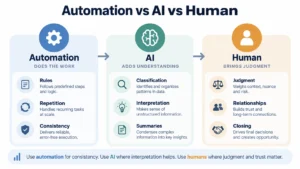
For example, AI may be useful for collecting initial information from an enquiry.
But once somebody starts discussing a complicated objection, unusual situation, sensitive concern, or high-value purchase decision, a person may need to take over.
That boundary should be designed intentionally.
My rule is simple:
Use automation for consistency. Use AI where interpretation helps. Use humans where judgment and trust matter.
What I Would Not Automate
This part is just as important.
I would be careful about fully automating complex negotiations, sensitive complaints, emotionally charged conversations, unusual customer circumstances, or decisions that require professional judgment.
Just because a workflow can continue doesn’t mean it should.
Sometimes the best automation action is:
Stop the workflow and create a task for a person.
That’s still good automation.
Marketing Automation Tools: Which Platform Is Best?
There isn’t one platform I’d recommend for every business.
I’ve worked with systems involving GoHighLevel, CRM platforms, Zapier, email, SMS, WhatsApp, WordPress, forms, landing pages, Google Analytics, Google Tag Manager, and other integrations.
The software should come after the process.
If I don’t yet understand your customer journey, choosing the platform first is backwards.
For some lead-driven and appointment-based businesses, GoHighLevel can make sense because CRM, pipelines, forms, communication, calendars, and automation can live together.
Other organizations may need HubSpot, Salesforce, ActiveCampaign, Klaviyo, or a more customized stack.
The question isn’t:
“Which platform has the most features?”
It’s:
“Which system can reliably support the process we actually need?”
If you want the broader strategic view rather than a platform-by-platform comparison, my Marketing Automation & Growth Guide goes deeper into how I think about the complete system.
How Do You Know Whether Marketing Automation Is Working?
I don’t judge an automation project by how many workflows are running.
A CRM with forty automations isn’t automatically better than one with six.
I care about whether the system changes important business outcomes.
The metrics I usually care about include lead response time, contact rate, qualification rate, booking rate, appointment show rate, pipeline conversion, reactivation performance, and ultimately downstream sales or revenue where reliable attribution is available.
Different workflows require different metrics.
An appointment reminder shouldn’t be judged like a reactivation campaign.
A routing automation shouldn’t be judged like a sales nurture sequence.
Define the job first. Then measure whether it did that job better.
How Much Do Marketing Automation Services Cost in the USA?
There isn’t a responsible single answer.
A business that needs one lead-response workflow has a very different project from a company that needs CRM migration, multiple pipelines, email and SMS automation, appointment systems, AI, analytics, third-party integrations, and ongoing optimization.
Cost usually depends on the existing system, number of workflows, platforms involved, integration complexity, data quality, messaging requirements, reporting needs, and how much custom logic the business requires.
I would be cautious about choosing a provider purely by the number of automations included in a package.
Twenty unnecessary workflows aren’t more valuable than five that fix expensive problems.
Start with the business outcome.
Then scope the technology required to achieve it.
What Should You Look for in a Marketing Automation Specialist or Agency?
If you’re comparing marketing automation services in the USA, I wouldn’t only ask which platforms the provider knows.
I’d ask them to explain how they think.
Give them a real scenario.
For example:
A Facebook lead enters the CRM, receives an SMS, doesn’t respond, books three days later from an email, misses the appointment, then replies on WhatsApp. What happens now?
The answer should reveal whether they’re building isolated workflows or thinking about the entire customer journey.
A good system should make it possible to determine who owns the opportunity, what stage the person belongs in, which messages should stop, which workflow should begin, what the salesperson needs to see, what gets measured, and what happens if part of the process fails.
You don’t need the most complicated system.
You need one you can explain.
Common Marketing Automation Mistakes
The biggest mistake I see is automating a process nobody has properly defined.
If the sales team doesn’t agree on what “qualified” means, automation won’t fix that.
If nobody owns the lead, automated reminders won’t fix accountability.
If pipeline stages mean different things to different people, building triggers around those stages can make the data worse.
Another mistake is simply sending too much.
More follow-up does not automatically equal more sales.
Automated communication still affects how people perceive your business.
And one of the easiest ways to make automation feel robotic is forgetting stop conditions.
If somebody books, replies, purchases, or changes status, the workflow needs to understand that the context changed.
Frequently Asked Questions
Is Marketing Automation Only for Large Companies?
No.
Smaller businesses can benefit significantly when repetitive follow-up, appointments, enquiries, or customer communication are already consuming team time.
The complexity should match the size of the problem.
A small business doesn’t need enterprise architecture to automate new-lead response.
Can Marketing Automation Increase Sales?
Automation can improve processes that affect sales, such as response time, consistency, qualification, appointment attendance, pipeline visibility, and reactivation.
It cannot rescue a poor offer, bad product, unqualified traffic, or weak sales process by itself.
What Is the Difference Between CRM and Marketing Automation?
I think of the CRM as the memory of the customer journey.
It holds information about the person, source, history, ownership, and current stage.
Automation uses that information and real-world events to decide what should happen next.
Should a Small Business Use GoHighLevel?
It can be a strong option for lead-driven and appointment-based businesses that want CRM, pipelines, forms, communication, calendars, and workflows inside one system.
But I wouldn’t choose it purely because it is popular.
Choose the platform based on your actual workflow and integration requirements.
If you want to see how I solved an actual GoHighLevel workflow problem rather than reading a generic platform review, see my GoHighLevel Missed Call Automation Case Study.
Can AI Replace a Marketing Automation Specialist?
AI can accelerate parts of implementation, analysis, communication, and workflow creation.
But somebody still needs to understand the business process, decide what should happen, design exceptions, connect systems, test the workflow, and determine where people need to take over.
How Long Does Marketing Automation Take to Implement?
It depends heavily on complexity.
A focused workflow may be straightforward.
A system involving CRM restructuring, migration, multiple lead sources, communication channels, AI, sales pipelines, reporting, and external integrations requires more discovery and testing.
I prefer determining the scope after understanding the current process rather than giving every business the same timeline.
The Goal Isn’t More Automation
When I started working with automation, it was easy to get excited about what the software could do.
Build another workflow.
Add another trigger.
Connect another application.
Use another AI tool.
Eventually, you learn that complexity has a cost.
Every workflow has to be understood, tested, and maintained.
Every message affects a real person.
Every integration creates another place where something can fail.
So today, I think about marketing automation differently.
The goal is not to automate as much of the business as possible.
The goal is to build the smallest reliable system that makes sure important opportunities don’t disappear between marketing and revenue.
Sometimes that means AI.
Sometimes it means a sophisticated integration.
And sometimes it means five very simple steps inside the CRM that work every single time.
That’s the kind of automation I trust.
Before You Spend More Money Generating Leads, Check What Happens to the Leads You Already Have
If your business is already generating enquiries but follow-up feels inconsistent, pipeline visibility is weak, appointments are being missed, or too much work still depends on manual reminders, the first step may not be another advertising campaign.
It may be fixing the journey after the lead arrives.
If you want to see more of how I approach these systems, start with my Marketing Automation & Growth Guide, review the Healthcare Growth System Case Study, or look at the technical problem-solving inside my GoHighLevel Missed Call Automation Case Study.
And if you operate a clinic or med spa, my Marketing Automation for Clinics & Med Spas article covers that customer journey specifically.
Before generating more leads, make sure the system behind those leads is capable of handling them.